Know if your business is ready for AI
Forty questions across eight areas. You get a clear rating, a plan for what to fix first, and the policies to fix it, already filled in with your details.
Not ready to book? Take the free two-minute readiness check or start with a Shadow AI check
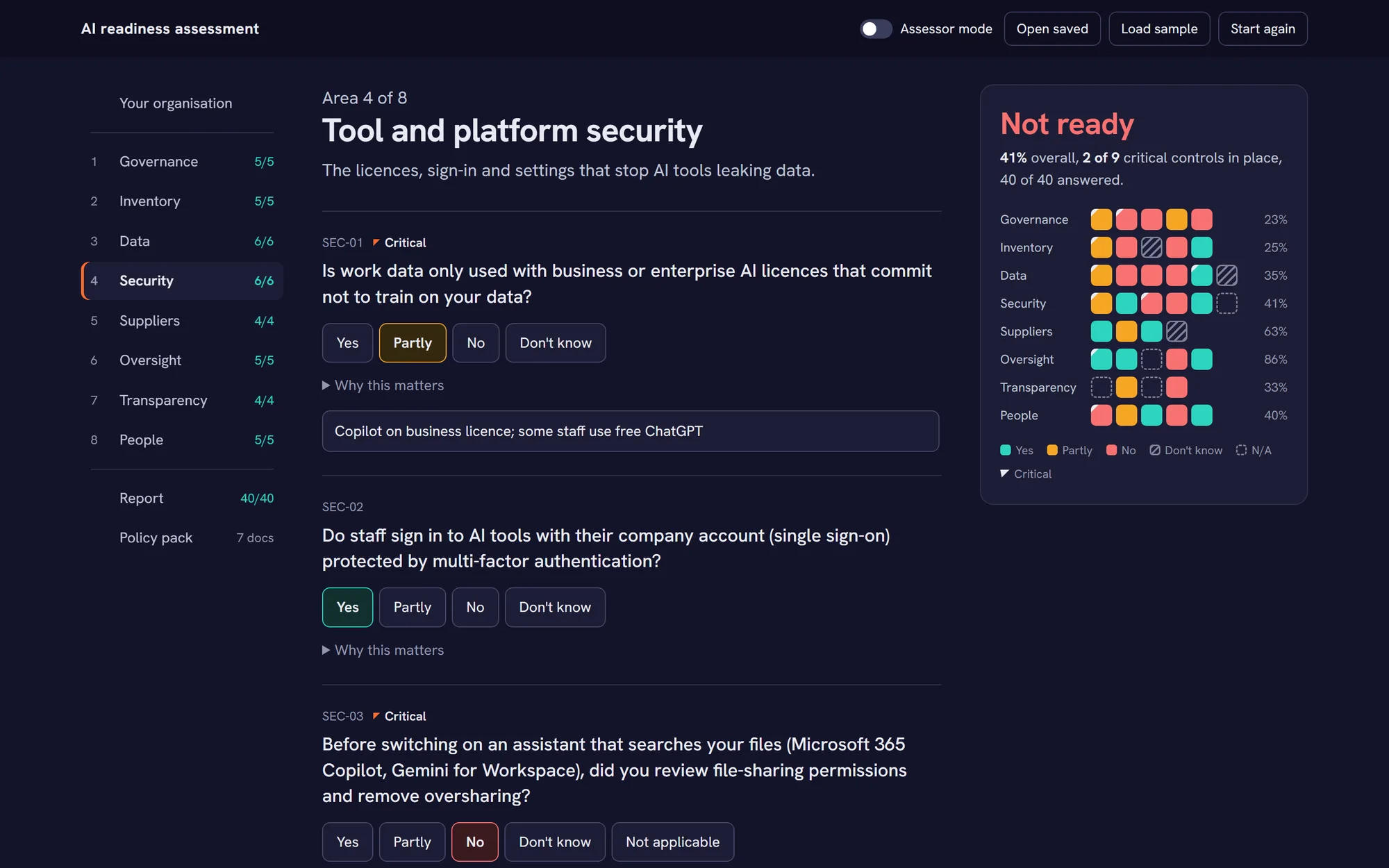
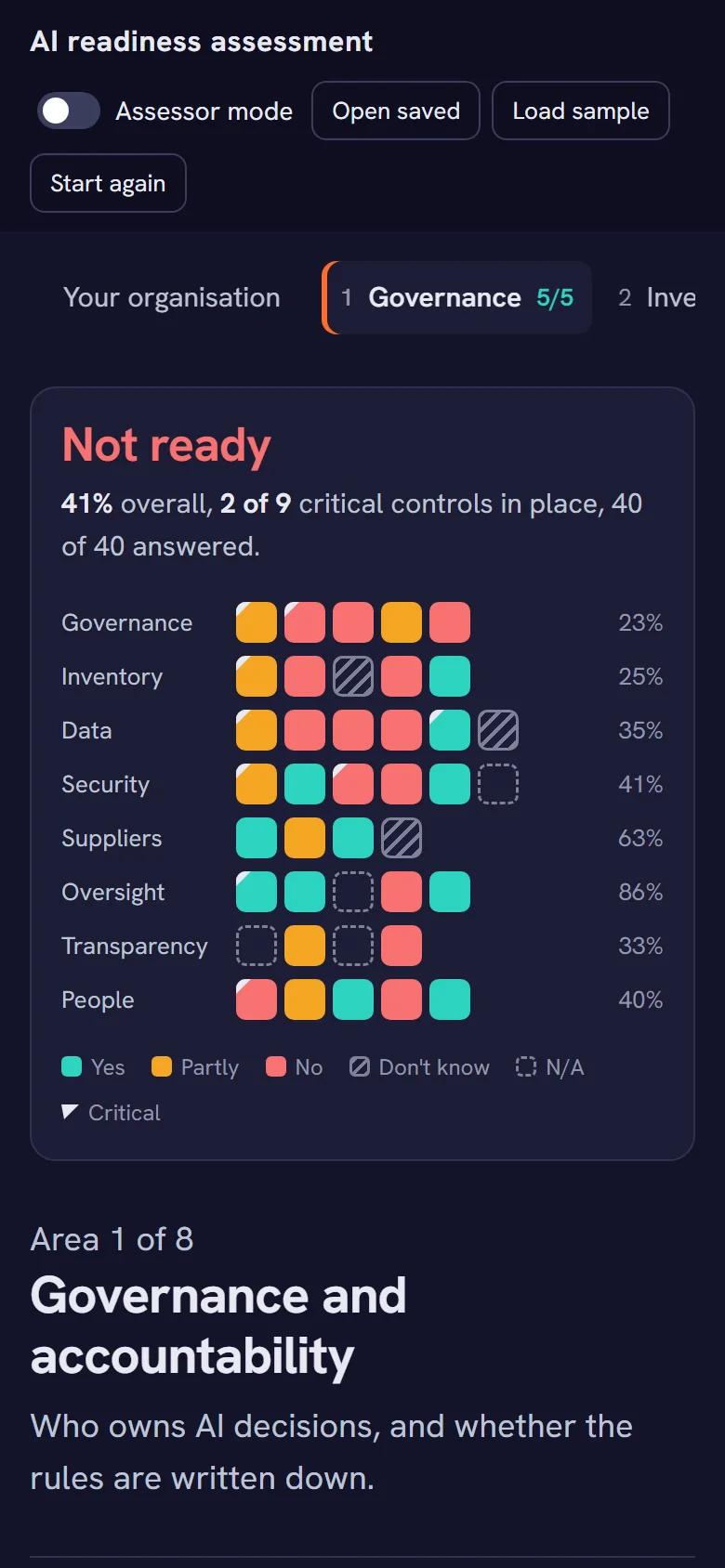
Example result for a fictional 18-person accountancy firm.
Answer with someone who knows
A consultant takes you through every question in a single session. Each answer updates the result as you go, so you see where you stand before the call ends.
Plain questions
Every question explains why it matters and what good looks like. "Don't know" is a fair answer: it's counted as a gap until someone finds out.
Nine critical controls
Some gaps matter more than a score. Without all nine in place, for example rules on what data goes into AI, nobody is rated Ready.
Checked, if you want proof
On the Verified level, the consultant checks the evidence and your Microsoft 365 settings, and the report says so.


A report you can act on
Every gap becomes an action, with the reason and what to do, in the order that matters.
- RatingReady, Partially ready or Not ready, with the overall score
- Scores by areaWhere you're strong and where to look first
- Critical controlsThe nine that decide whether you can be rated Ready
- Action planEach gap with your answer, what to do and which document helps
The policies, already written
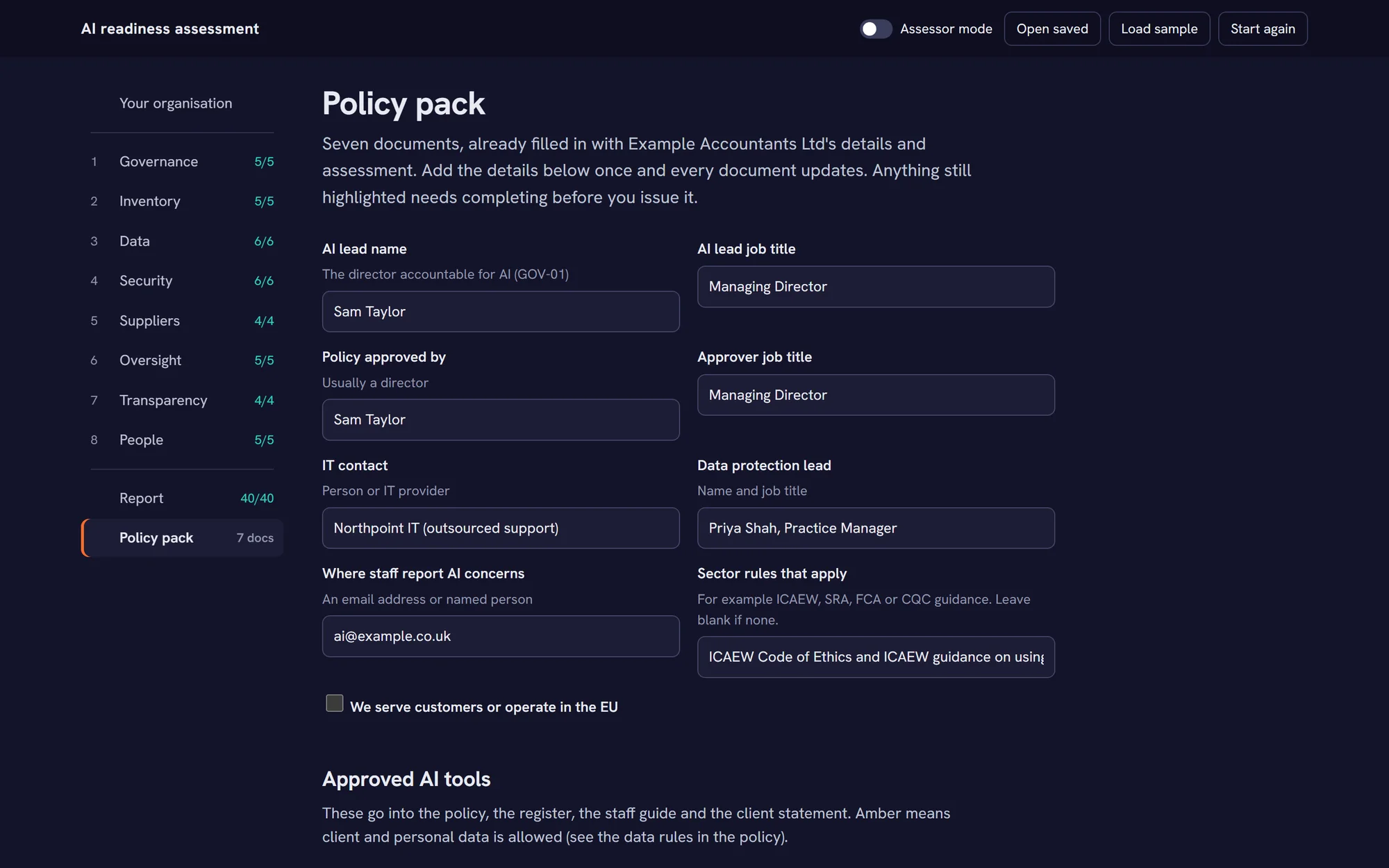
Seven documents filled in with your organisation's name, people, approved tools and sector rules. Review them, adjust them, and issue them. Download as PDF or edit in Word.
 AI Acceptable Use PolicyThe rules for every member of staff, with a sign-off sheet
 Staff AI quick guideThe policy on one page
 AI Tool RegisterEvery approved tool, owner and review date
 AI Supplier ChecklistWhat to ask before approving a tool
 AI DPIA templateFor higher-risk uses of personal data
 AI incident playbookThe first hour, the first day, the 72-hour deadline
 AI statement for clientsYour answer to "how do you use AI?"
Details once, every document updated
Tell us who leads on AI, who handles data protection and which tools are approved. Anything still missing is highlighted, and the client statement won't promise controls you don't have yet.
How it works
Three steps, from the first meeting to policies your staff sign.
- The session
Meet your consultant
About an hour, with whoever leads on AI, IT and data protection. We go through the questions together.
- Same day
Your result, straight away
See your rating and each area's score during the meeting. Then the full report, and we agree the priorities together.
- First 30 days
Gaps closed
Work through the first 30 days' actions with the policies ready to adopt. We reassess after 12 months, or sooner if the way you use AI changes.
Find the AI your staff already use
Most firms have more AI in use than anyone approved. The Shadow AI check reads your Microsoft 365 and shows which AI tools are connected to company accounts or installed on company devices, before you write a single rule.
Shadow AI
AI tools connected to company accounts or installed on company devices.
| AI tool | How we found it | Who | Can read | Our starting view |
|---|---|---|---|---|
| ChatGPT | Connected, installed | 5 people, 4 devices | Files | Allow on a business plan |
| Grammarly | Connected | 8 people | Profile only | Allow with limits |
| Otter.ai | Connected | 3 people | Calendars, meetings | Check before approving |
| Claude | Installed | 2 devices | Sign-in only | Allow on a business plan |
| DeepSeekNew | Installed | 1 device | Sign-in only | Not for company data |
| Ollama | Installed | 1 device | Sign-in only | Allow with limits |
Shadow AI
Example Accountants Ltd
Not for company data
Allow on a business plan
Check before approving
Allow with limits
What it finds
AI apps people have signed in to with their work account, AI apps on devices you manage, what each one can read (files, mail, calendars), and when it was last used.
What you get
A short Shadow AI report (PDF) with our starting view on each tool, and a 30-minute call to decide what to allow, limit or stop.
How it's done
Read-only. Your administrator approves access once and can remove it any time. We never read anyone's emails, files, chats or prompts.
£295
One-off, for up to 25 staff, plus VAT. Comes off the assessment if you book it within 90 days.
How much help do you need?
Every level starts with the same assessment. Close the gaps yourself with the plan and the policies, or let us close them with you.
Report
A clear picture and a plan
from £795
- Assessment session
- Report and action plan
- Policy pack, filled in
- Leadership read-out, up to an hour
Verified
When clients or insurers want proof
from £1,950
- Everything in Report
- Evidence checked for every critical control
- Microsoft 365 checked automatically: sign-in, app approvals, AI apps connected to staff accounts, file sharing
- Data loss prevention and audit settings reviewed with you
- Report marked Verified
Recommended
Fix
When you want the gaps closed for you
from £2,950
- Everything in Verified
- We fix the Microsoft 365 settings with you: multi-factor sign-in, app approvals, sharing links and guest invitations. Each change is explained and agreed before it's made
- Your AI policy launched: a 45-minute session for all staff
- Checked again after 30 days, with an updated report
One-off prices for up to 25 staff, plus VAT. Larger teams get a fixed quote.
Common questions
If yours isn't here, ask us when you book.
Is this a certification?
No. It's a readiness assessment based on what you tell us and, on the Verified level, what we check. It isn't a certification, an audit opinion or legal advice. Official certification against ISO/IEC 42001 can only come from an accredited certification body, and the assessment is a good first step towards it.
How much does it cost?
For up to 25 staff: Report from £795, Verified from £1,950, and Fix, where we close the gaps with you, from £2,950. The Shadow AI check is £295, or £395 for 26 to 100 staff. All prices are plus VAT, fixed and agreed before we start, with no day rates. For larger teams we give a fixed quote. Afterwards, if you want to stay current: the annual reassessment from £495 a year, Ongoing with quarterly Microsoft 365 checks from £375 a quarter, or Shadow AI monitoring from £49 a month.
How long does it take?
One session of about an hour to answer the questions, then a read-out of up to an hour with your leadership team: the rating, the top five priorities and who does what next. The report and the policy pack come in between.
Do you need access to our systems?
Not for the Report level. For Verified, we need read-only access to your Microsoft 365 settings, or we review them with you on screen. We never change anything.
More questions
Can you fix the gaps for us?
Yes, that's the Fix level. We change the Microsoft 365 settings the assessment flags, such as multi-factor sign-in, which apps staff can approve, "Anyone" sharing links and guest invitations. Nothing is changed until you've agreed it, and you can see every change we made. We also run a short session to launch your AI policy with staff, and check again after 30 days. Bigger jobs, like cleaning up years of file sharing before Copilot, are quoted separately.
Who should take part?
The person who will be accountable for AI, ideally a director, whoever looks after your IT, and whoever handles data protection. In a small business that may be two people.
We use Google Workspace, not Microsoft 365. Does it still work?
Yes. The questions, the report and the policies cover any tools, including Gemini and ChatGPT. The settings checks on the Verified level are for Microsoft 365 for now.
Can we tell our clients about the result?
Yes, in these words: "assessed as [rating] for the safe use of AI, based on information provided on [date]". The policy pack also includes a one-page AI statement for clients, which only promises what you have in place.
How long is the result valid?
Twelve months, or until you make a significant change, such as rolling out Copilot to everyone or adding a chatbot for customers.
All 40 questions, by area
Forty questions in eight areas, the ones you go through with your consultant. Those marked critical must be fully in place for a Ready rating. Two optional sets can be added: choosing which AI uses to adopt next and checking they pay off, and extra controls for health and care providers (clinical safety, NHS data and patients).
Governance and accountability5 questions. Who owns AI decisions, and whether the rules are written down.
- Is one named person (ideally a director) accountable for how the business uses AI?Critical
- Do you have a written AI policy (acceptable use) that all staff have read and accepted?Critical
- Does a new AI tool, or a new use of an existing one, need approval before staff start using it?
- Have you identified the laws, regulations and client contract terms that affect your use of AI?
- Does management review AI use, risks and incidents at least once a year?
AI inventory and shadow AI5 questions. Knowing which AI tools are in use, including the ones nobody approved.
- Do you keep a register of every AI tool in use, including AI features inside software you already have (e.g. Microsoft Copilot, Gemini, Zoom/Teams AI notes, CRM assistants)?Critical
- For each tool, does the register record an owner, its purpose, what data goes into it and the licence type (free or business)?
- Do you know whether staff use free or personal AI accounts (e.g. free ChatGPT, personal Gemini) for work?
- Are unapproved AI tools and AI browser extensions blocked or monitored on company devices?
- Are AI meeting recorders and note-takers controlled (who can switch them on, and when)?
Data protection and privacy6 questions. What goes into AI tools, and your duties under UK GDPR.
- Are there clear rules on which data can and cannot be put into AI tools (personal data, client data, confidential information)?Critical
- Is your data classified or labelled so staff and tools can tell what is confidential?
- Where AI processes personal data in a higher-risk way, have you completed a Data Protection Impact Assessment (DPIA)?
- Does your privacy notice tell people where AI is used with their personal data?
- Are significant decisions about people (hiring, pay, credit, eligibility, discipline) always reviewed by a human rather than made by AI alone?Critical
- Do your retention rules cover AI prompts, chat histories, transcripts and AI-generated outputs?
Tool and platform security6 questions. The licences, sign-in and settings that stop AI tools leaking data.
- Is work data only used with business or enterprise AI licences that commit not to train on your data?Critical
- Do staff sign in to AI tools with their company account (single sign-on) protected by multi-factor authentication?
- Before switching on an assistant that searches your files (Microsoft 365 Copilot, Gemini for Workspace), did you review file-sharing permissions and remove oversharing?Critical
- Do data-loss prevention rules or sensitivity labels stop confidential data being pasted into, or surfaced by, AI tools?
- Is AI activity logged so you can investigate if something goes wrong?
- If you build or connect your own AI (chatbots, automations, API keys, agents), are keys stored securely and is it security-tested before going live?
Suppliers and contracts4 questions. What your AI suppliers do with your data, and what your contracts allow.
- Have you checked each AI supplier's terms on whether your data is used to train their models?
- Do you know where each AI supplier stores and processes your data (UK, EU, US) and what transfer safeguards apply?
- Is a data processing agreement in place with every AI supplier that handles personal data?
- Have you checked your client contracts for clauses that limit or require disclosure of AI use on their data or work?
Human oversight and output quality5 questions. Checking AI output before anyone relies on it.
- Must staff check AI output for accuracy before it goes to a client or is relied on?Critical
- Do higher-risk uses (legal, financial, medical, HR or safety advice) get an extra review by a qualified person?
- Where AI affects people (e.g. CV screening, customer eligibility), have you checked for bias or unfair outcomes?
- Do you have rules on copyright and intellectual property for AI, both for what goes in and what comes out?
- Could the business keep working if a key AI tool failed, changed or had to be switched off?
Transparency4 questions. Being open with customers and colleagues about where you use AI.
- Are customers told when they are dealing with AI (e.g. a website chatbot or automated replies)?
- Are people told, and asked to agree, before a meeting or call is recorded or transcribed by AI?
- Are AI-generated images, video or voice labelled where they could mislead?
- Can you quickly answer a client's questions about how you use AI (e.g. in a supplier due-diligence questionnaire)?
People, training and incidents5 questions. Training, reporting, and what happens when something goes wrong.
- Have all staff completed AI awareness training in the last 12 months?Critical
- Does training cover what data not to share, checking AI output, and spotting AI-driven scams (deepfake voice/video, AI phishing)?
- Do staff know how to report an AI mistake, a data leak into an AI tool, or a concern about AI use?
- Does your incident response plan cover AI incidents (data pasted into a public AI, deepfake fraud, chatbot misuse)?
- Do your joiner and leaver processes include AI accounts and licences?
Find out where you stand
Tell us a little about your organisation and we'll reply within one working day to arrange your assessment.
- We confirm the level and a date for the session.
- You get a short list of what to have ready.
- Nothing is charged until you've agreed the price.